Wulfs corner for hosting an LLM!
-
Step 1: acquire harware...
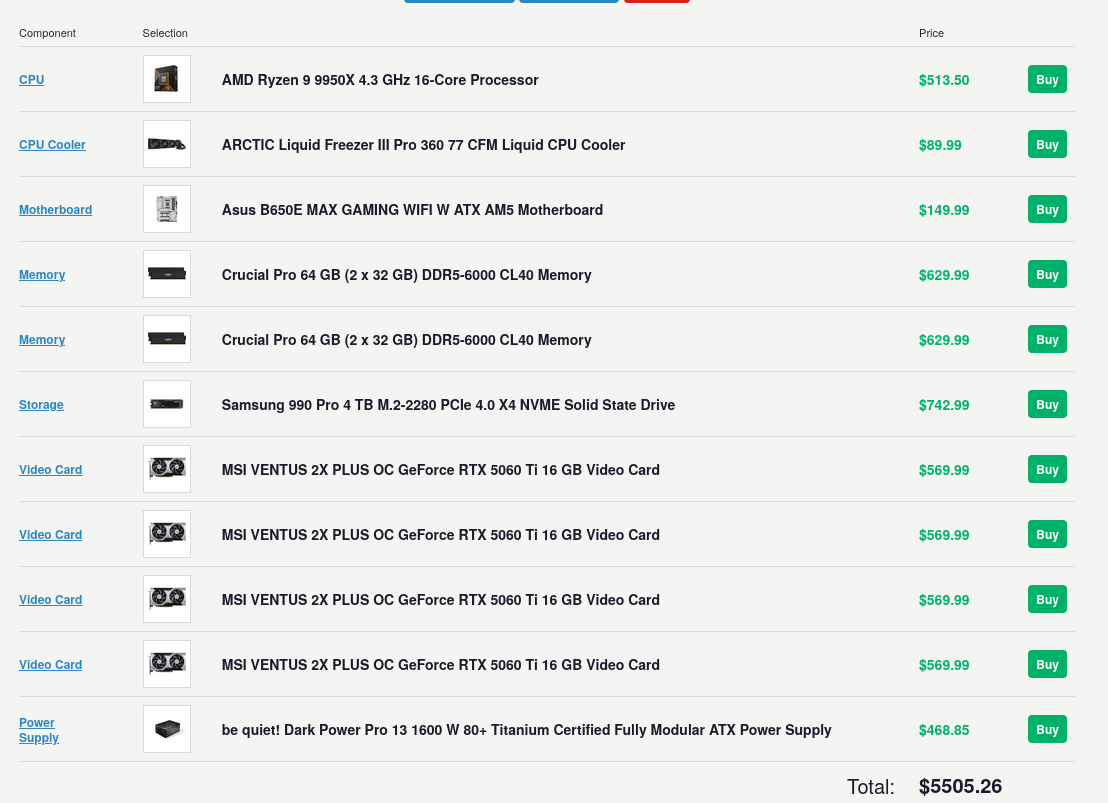
I have made a list of hardware I would like to use. I'm going to try to keep on track for it but largely things are going to change due to price fluctuations as well as looking at local markets (FB market place, etc). I'm going to try to host Qwen3.5-35B_A3B on nobara.
Qwen3.5-35B_A3B specs per grok:
Total parameters: 35 billion.
Activated parameters per token: ~3 billion (hence the "A3B" suffix). This comes from a sparse MoE setup with 256 experts total, of which only 8 routed + 1 shared expert activate per forward pass (roughly 3.5% activation rate).
Layers: 40 total.
Hidden dimension: 2048.
Vocabulary size: 248,320 (padded).
Hybrid layout (repeated 10 times): 3 × (Gated DeltaNet → MoE) followed by 1 × (Gated Attention → MoE). This mixes linear attention (for efficiency) with occasional full softmax attention.Gated DeltaNet details (linear attention component):32 heads for V, 16 for QK.
Head dimension: 128.Gated Attention details (the "full" attention layers):16 heads for Q, 2 for KV (grouped-query style for efficiency).
Head dimension: 256.
Rotary Position Embedding (RoPE) dimension: 64.MoE details:Expert intermediate dimension: 512.
This hybrid design (Gated DeltaNet for most layers + sparse MoE FFN blocks) enables high throughput with low latency and minimal KV-cache overhead compared to pure Transformer models.The result is a model that behaves like a much denser/larger one during inference but only "pays" for ~3B active parameters. It often outperforms the prior flagship Qwen3-235B-A22B (dense or MoE variants) on many tasks while being dramatically cheaper and faster to run.Multimodal CapabilitiesIt is a unified vision-language model trained with early-fusion on multimodal tokens. It natively supports:Text.
Images.
Video.Strengths include:Visual reasoning.
Spatial grounding.
Document/UI analysis.
OCR.
Image captioning.
GUI interaction.It outperforms the previous Qwen3-VL series in these areas and achieves cross-generational parity (or better) with larger Qwen3 models on multimodal benchmarks. It handles tool use and agentic workflows that combine vision + reasoning + code.
Context and EfficiencyNative context length: 262,144 tokens (~393 A4 pages of text).
Extendable to ~1 million tokens via RoPE/YARN scaling.
Strong context scaling: throughput degrades very little even at long contexts (e.g., only ~0.9% drop in some tests from 512 to 8k+ tokens).
Supports up to ~65k output tokens in many deployments.Inference speed is a major selling point:On consumer hardware (e.g., quantized Q4/Q5 or FP8):RTX 3090 (~$800 used): ~110–112 tokens/second at full 262k context.
RTX 4090: ~122 tokens/second.
RTX 5090: up to ~170 tokens/second.
Apple Silicon (M1/M4 Macs, 24–64GB unified memory): 15–37+ tokens/second depending on quantization and prompt length.
High-end servers (H100/H200): hundreds to over 1,000 tokens/second in batched/optimized setups.Quantized versions (e.g., 4-bit, FP8, GGUF) fit comfortably on 24GB VRAM cards or even lower with offloading. Some reports show it running on as little as 8–19GB VRAM effectively.
It is designed for production: low latency, high throughput, and suitable for local/agentic use cases (many users report it replacing multi-model setups for coding + reasoning workflows).Performance HighlightsThe model shines in efficiency-vs-performance tradeoffs. It delivers:Reasoning and knowledge: Competitive with or better than much larger models. Examples from benchmarks:MMLU-Pro: ~85.3%.
GPQA Diamond: ~84.2%.
Strong on math (e.g., HMMT), multilingual (C-Eval), and general knowledge.Coding and agentic tasks: Excellent at software engineering, tool use, and multi-step agentic workflows (planning + coding + analysis). Users frequently call it a "gamechanger" for local coding agents, often handling full tasks (data analysis + code + insights) in a single model where previously two were needed.
Multimodal: Improved over prior VL models in document understanding, visual reasoning, and GUI tasks.
Overall intelligence indices place it high among open models of its class, sometimes approaching or rivaling closed models like Claude Sonnet variants or GPT-5-mini in specific domains (reasoning, coding, agents).It supports 201 languages and dialects with nuanced cultural understanding. Post-training includes scaled reinforcement learning (RL) across complex, progressively harder tasks for better real-world generalization.Other Practical DetailsLicense: Apache 2.0 (fully open weights; base and instruction-tuned variants available on Hugging Face).
Deployment: Works with Hugging Face Transformers, vLLM, llama.cpp, Ollama, LM Studio, MLX (Apple), etc. FP8 and various GGUF quants are popular.
Hosted versions: Powers things like Qwen3.5-Flash on Alibaba Cloud (fast/cheap tier).
Uncensored variants: Community fine-tunes exist for minimal refusals.
Limitations (as with any model): Still has occasional hallucinations on edge cases; multimodal performance depends on input quality; very long contexts can still tax lower-end hardware in prefill phase.In short, Qwen3.5-35B-A3B is one of the best examples yet of how architectural innovations (hybrid linear attention + sparse MoE + high-quality training/RL) can break traditional scaling expectations. It gives frontier-like capabilities (reasoning, coding, vision, agents) at the inference cost of a much smaller dense model, making it highly practical for local runs, agentic systems, and cost-sensitive production use. Many in the community view it as a turning point for accessible high-intelligence local AI.
-
Here's a realistic assessment of how 4× RTX 5060 Ti 16GB performs when running Qwen3.5-35B-A3B (the native vision-language MoE model with ~35B total parameters but only ~3B active per token).Key Hardware ContextEach RTX 5060 Ti 16GB (Blackwell architecture) has:4,608 CUDA cores
16 GB GDDR7 VRAM
448 GB/s memory bandwidth (128-bit bus)
5th-gen Tensor Cores (strong for quantized inference)
180W TDPTotal across 4 cards: ~64 GB VRAM pool. This is enough to fully load the model weights (even at higher-quality quants) + substantial KV cache for long contexts, with tensor parallelism (TP=4) in engines like vLLM or SGLang. No heavy CPU offloading is needed for the core model, unlike single-GPU setups.The narrow 128-bit bus per card creates a mild bandwidth bottleneck compared to higher-end cards (e.g., RTX 4080/4090 with 256-bit+ buses), but the sparse MoE nature (only ~3B active params) and hybrid attention help mitigate this significantly.Expected PerformanceCommunity reports and scaling patterns for this exact model + similar Blackwell mid-range GPUs show:Single RTX 5060 Ti 16GB (with smart MoE offloading, e.g., --n-cpu-moe 24 in llama.cpp + Q4_K_M):~40–70 tokens/s generation (decode) at medium-to-long contexts (e.g., 65K–100K).
Real examples: 43 t/s or up to 57 t/s reported in LM Studio with optimized MoE layer tuning and 64 GB+ system RAM.With 4× RTX 5060 Ti (TP=4, full GPU acceleration):Single-request generation (decode) speed: 280–450 tokens/s (realistic well-optimized range).Conservative end (~280–350 t/s): Typical with Q4/AWQ/INT4, standard vLLM setup, medium context.
Optimistic end (~400–450+ t/s): FP8 or high-quality GPTQ, prefix caching enabled, flash attention, MoE expert-parallel optimizations, short-to-medium context.Aggregate throughput (multiple concurrent requests/batching): 700–1,300+ total tokens/s, depending on batch size and workload. This makes it suitable for serving several users or agentic workflows simultaneously.
Prefill (prompt processing): Strong due to the model's efficient context scaling — hundreds to low thousands of tokens/s at shorter prompts, with graceful degradation at 100K+ context (minimal % drop in decode thanks to the hybrid Gated DeltaNet + MoE design).Compared to 4× RTX 4080 (previous estimate ~350–500+ t/s), expect 15–30% lower overall throughput here. The main reasons are lower per-GPU memory bandwidth and slightly reduced compute per card, even though Blackwell's Tensor Cores and efficiency help close the gap in quantized workloads. Still, the 4× 5060 Ti setup remains very snappy for local use — far faster than a single high-end GPU for most interactive/agentic tasks.Context handling is excellent: Native 262K tokens with only minor decode slowdown even at very long prompts. Multimodal (image/video) inputs add some overhead but remain viable.Optimization Tips for Best ResultsEngine: vLLM or SGLang with --tensor-parallel-size 4 + MoE-specific flags (expert parallel if available) + prefix caching. llama.cpp works but is less efficient for multi-GPU TP.
Quantization: FP8 or AWQ/GPTQ-INT4 for highest speed/quality balance.
Q4_K_M GGUF is excellent and memory-efficient; avoid overly aggressive dynamic quants on MoE (they can hurt quality more than on dense models).
Use q8_0 KV cache — it's often a "free lunch" for speed + VRAM savings.Other tweaks: Fast PCIe 5.0 motherboard helps reduce inter-GPU communication overhead. At least 64–128 GB system RAM is useful for KV cache or fallback.
Power & Cooling: Total GPU draw ~720W + system — ensure good PSU and case airflow.Real-World FeelChat / interactive use: Extremely responsive (sub-second responses for normal outputs).
Coding / agentic workflows: Handles full multi-step tasks (planning, code generation, analysis, tool use) quickly. Many users find this model on efficient hardware replaces needing separate specialist models.
Multimodal: Solid for document/UI understanding, OCR, visual reasoning, and GUI agents.
Limitations: Prefill can slow at extreme 200K+ contexts on consumer PCIe (but decode stays strong). Some bandwidth sensitivity on MoE expert routing, though far less pronounced than on dense models or larger MoEs.Overall, 4× RTX 5060 Ti 16GB is a strong, cost-effective multi-GPU setup for Qwen3.5-35B-A3B. It delivers frontier-like capabilities (high reasoning, coding, vision) at practical speeds for local/agentic use — think high hundreds of tokens/s for generation, with excellent efficiency thanks to the model's sparse design. It's noticeably better than single mid-range GPU but won't quite match 4× higher-bandwidth cards like 4080/5090.If you share specifics (planned engine, quantization, typical context length, single-user vs. serving, or system RAM/CPU), I can refine the estimate further or suggest exact launch commands. Benchmarking your actual rig is always recommended, as software optimizations (new kernels in vLLM/llama.cpp) continue to improve these numbers.
-
ALL BULLET POINTS ARE TO BE RAN IN CONSOLE
I'm planning on using nobara as my OS for the PC. I'm choosing this simply for the convenience of drivers.
Nobara makes NVIDIA driver installation easy, which is ideal since this model runs best with CUDA on your 4× RTX 5060 Ti setup. The model is a sparse MoE (~35B total params, only ~3B active per token), so it's efficient but still needs good quantisation and optimisation for multi-G
1. Update Nobara & Install NVIDIA Drivers (CUDA)Nobara has excellent NVIDIA support out of the box. Open a terminal and run:
- sudo dnf update -y
- sudo dnf install -y nobara-welcome # if not already installed
Launch Nobara Welcome app → Go to Drivers tab.
Install the latest NVIDIA drivers (proprietary, recommended for AI).
Reboot when prompted.
After reboot, verify CUDA:
- nvidia-smi
- nvcc --version # Should show CUDA 12.x or 13.x
If nvcc is missing, install the CUDA toolkit:
- sudo dnf install -y cuda-toolkit
2. Easiest Option: Use Ollama (Recommended for Beginners)
Ollama is the simplest way to get started.
- curl -fsSL https://ollama.com/install.sh | sh
Then pull and run the model (it will download a quantized version automatically):
- ollama run qwen3.5:35b-a3b
This works well for chat and basic use.
For better performance with my 4 GPUs, you may need to configure it manually or switch to other tools below.3. Best Performance Option: vLLM (Recommended for 4× RTX 5060 Ti)
vLLM gives the highest throughput, especially with tensor parallelism (TP=4).
First, install dependencies:
- sudo dnf install -y python3-pip python3-venv git build-essential cmake
Create a virtual environment:
-
python3 -m venv ~/qwen-vllm
-
source ~/qwen-vllm/bin/activate
-
pip install --upgrade pip uv
Install vLLM (use the nightly/main branch for best Qwen3.5 support)
- uv pip install vllm --torch-backend=auto --extra-index-url https://wheels.vllm.ai/nightly
Or for more stability
- uv pip install git+https://github.com/vllm-project/vllm.git
Launch the model with 4 GPUs
- vllm serve Qwen/Qwen3.5-35B-A3B
--tensor-parallel-size 4
--max-model-len 262144
--dtype auto
--gpu-memory-utilization 0.9
--enable-prefix-caching
--port 8000
This starts an OpenAI-compatible API at http://localhost:8000.
For quantized versions (faster on 16GB cards): Use a GPTQ/AWQ/FP8 quant from Hugging Face if available (search for Qwen3.5-35B-A3B-GPTQ or similar).
Add --quantization gptq_marlin or --kv-cache-dtype fp8 for extra speed.
Test it with:
- curl http://localhost:8000/v1/chat/completions
-H "Content-Type: application/json"
-d '{
"model": "Qwen/Qwen3.5-35B-A3B",
"messages": [{"role": "user", "content": "Hello!"}]
}'
4. Alternative: llama.cpp (Great for GGUF Quants + Multi-GPU)
If you prefer GGUF files (very efficient for MoE):
- git clone https://github.com/ggerganov/llama.cpp
cd llama.cpp
make -j LLAMA_CUDA=1 # or cmake with -DGGML_CUDA=ON
Download a good quant (e.g., from unsloth or bartowski on Hugging Face):
Example: Q4 or UD-Q4_K_XL
- huggingface-cli download unsloth/Qwen3.5-35B-A3B-GGUF --local-dir ./models --include "Q4.gguf"
Run with 4 GPUs (tensor parallel via multiple instances or server mode):
- ./llama-server -m models/Qwen3.5-35B-A3B-*.gguf
-ngl 99
--n-gpu-layers 99
-c 262144
--host 0.0.0.0 --port 8080
For multi-GPU, you can use --tensor-split or run multiple instances.
5. GUI Options (Optional but Nice)
LM Studio or Ollama WebUI (Open WebUI)
SillyTavern + KoboldCPP / llama.cpp backend
Jan.ai — Very user-friendly for model management
Install Open WebUI (if using Ollama or vLLM):
- docker run -d -p 8080:8080 --add-host=host.docker.internal:host-gateway -v open-webui:/app/backend/data --name open-webui --restart always ghcr.io/open-webui/open-webui:main
Tips for Your 4× RTX 5060 Ti Setup (per grok)
Use TP=4 in vLLM for best scaling.
Expected speed: ~280–450+ tokens/s generation (optimized, single stream).
Quantization: Start with Q4_K_M, AWQ, or FP8 — full precision won't fit well.
Context: The model supports native 262K tokens — set --max-model-len 262144.
Multimodal (vision): Works if you use the full model with image inputs in compatible frontends.
Monitor VRAM with nvidia-smi.
Troubleshooting
Out of memory → Lower --gpu-memory-utilization or use heavier quantization + MoE expert offloading.Slow performance → Ensure drivers are up to date and use vLLM nightly.
CUDA errors → Reinstall NVIDIA drivers via Nobara Welcome.
-
I already have a single RTX 5060 ti 16gb. But this build is going to cost me a lot of money.
Hello! It looks like you're interested in this conversation, but you don't have an account yet.
Getting fed up of having to scroll through the same posts each visit? When you register for an account, you'll always come back to exactly where you were before, and choose to be notified of new replies (either via email, or push notification). You'll also be able to save bookmarks and upvote posts to show your appreciation to other community members.
With your input, this post could be even better 💗
Register Login